Nimble Streamer Transcoder now provides a DVB teletext forwarding option for video streams.
DVB teletext forwarding allows Nimble Streamer to pass teletext data through, so it can be used later in other processing or delivery scenarios. This is useful when the incoming stream contains teletext data that must be preserved while the video is being transcoded, repackaged, or prepared for downstream workflows. DVB teletext can be obtained from any supported protocols as well as from SDI Decklink input.
When to Use DVB Teletext Forwarding
DVB teletext may be used for subtitles, accessibility workflows, regional services, or other metadata-related use cases in broadcast and OTT environments.
When DVB teletext forwarding is enabled, Nimble Streamer can receive teletext data from the source stream and forward it to selected outputs. It also makes it possible to keep teletext available after transcoding instead of losing it during video processing.
Prerequisite: Enable DVB Subtitles Processing
We assume you’re familiar with Nimble Streamer, its live streaming capabilities.
Before using the DVB teletext forwarding options in the transcoder UI, DVB subtitles processing must be enabled in Nimble Streamer configuration.
Add the following line to nimble.conf:
dvb_subtitles_processing_enabled = trueAfter changing nimble.conf, restart Nimble Streamer for the setting to take effect, read this page for more params.
Forwarding DVB teletext through SRT, MPEGTS UDP, Zixi and RIST
DVB teletext can be delivered via MPEGTS-based protocols:
Once you have DVB subtitles processing enabled (see dvb_subtitles_processing_enabled parameter above), Nimble will automatically pass through the DVB teletext from and to any of the protocols above.
Whatever combination you make with the protocols above, the teletext will be delivered as part of the output. For example, you can receive the teletext as part of UDP stream and it will be delivered via SRT. All you need to do is to define the input and output streams. Nimble Streamer will then preserve DVB teletext, and forward it.
Forwarding DVB Teletext in Live Transcoder
Once you create a Transcoder scenario, put Video source and Video encoder to it. You’ll configure all necessary decoder and encoder settings and then add extra parameters for teletext.
DVB teletext forwarding must be enabled in two places:
- On the input side, in Video source
- On the output side, in Video encoder
Both options are available under Expert options.
Here’s example of enabling DVB teletext in source.
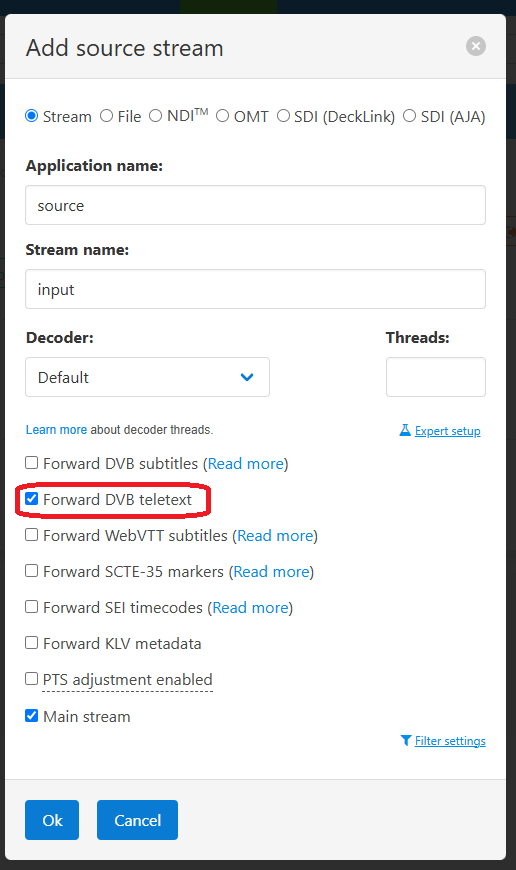
This allows Nimble Streamer to take DVB teletext data from the incoming stream and make it available inside the transcoding workflow.
And here’s an example of enabling DVB teletext on encoder side
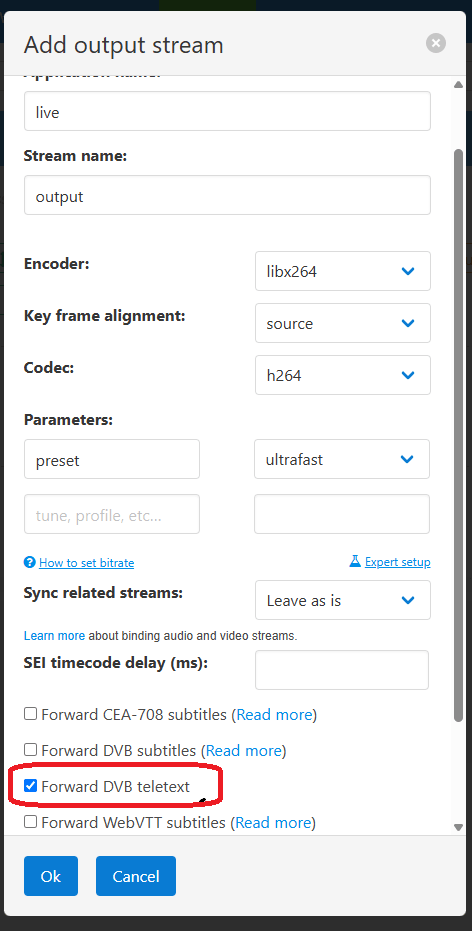
This allows the selected encoder output to forward DVB teletext further downstream.
Now you add any filters that you need for your processing use case and add audio.
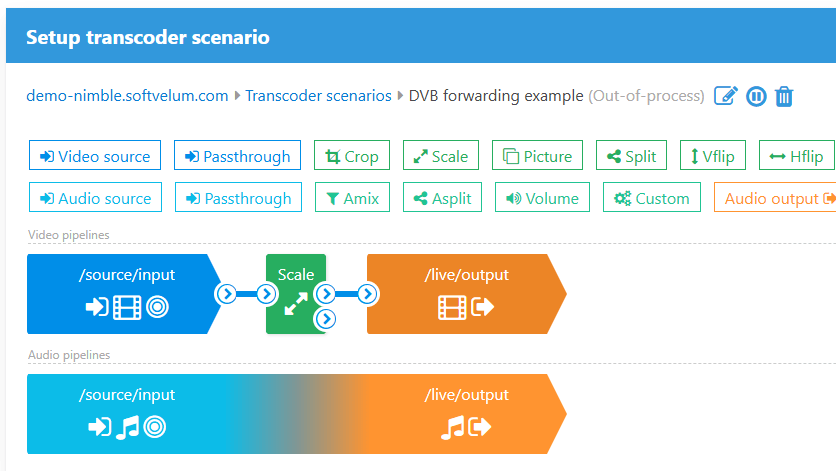
That’s it. Once you save scenario, it will be applied to Nimble instance within a few seconds.
Why the option must be enabled on both Input and Output
DVB teletext forwarding is configured separately for input and output because a single transcoding scenario may produce multiple outputs.
For example, one input stream may be transcoded into several renditions or delivery profiles. In this case, you may want to forward teletext only for specific outputs while leaving it disabled for others.
This gives more control over the workflow:
- The Video source option enables teletext intake from the original stream.
- The Video encoder option controls whether teletext is forwarded for a specific output.
As a result, teletext forwarding can be enabled only where it is actually needed. Because forwarding is configured separately for the source and encoder, engineers can control exactly which workflows and outputs should carry DVB teletext data. This is especially useful in multi-output transcoding scenarios where only some renditions or delivery paths require teletext preservation.
Conclusion
The DVB teletext forwarding option in Nimble Streamer makes it possible to preserve teletext data during transmuxing and transcoding, in order to pass it into selected outputs for further use.