If you’ve been running WebRTC delivery with Nimble Streamer, you know that audio codec mismatches have historically been one of the most common reasons you’d need transcoding in your pipeline. The WebRTC playback – including WHEP – expects Opus audio. Most ingest protocols, until now, delivered AAC or MP3. That gap meant CPU time, added latency, and extra configuration for transcoding.
That gap is now closed. Nimble Streamer adds Opus audio support via Enhanced RTMP and RTSP, meaning you can ingest an Opus-carrying stream and pass it straight through to WebRTC WHEP playback, no transcoding required.
Opus ingest, native passthrough
The update covers two ingest protocols.
Enhanced RTMP: Nimble now supports the Enhanced RTMP specification, which extends classic RTMP to carry modern codecs. With this, Opus audio can arrive alongside AVC/H.264, VP8, VP9 or even AV1 video in a single RTMP stream.
RTSP: Opus audio is now also accepted over RTSP ingest, pairable with AVC/H.264, VP8, or VP9 video.
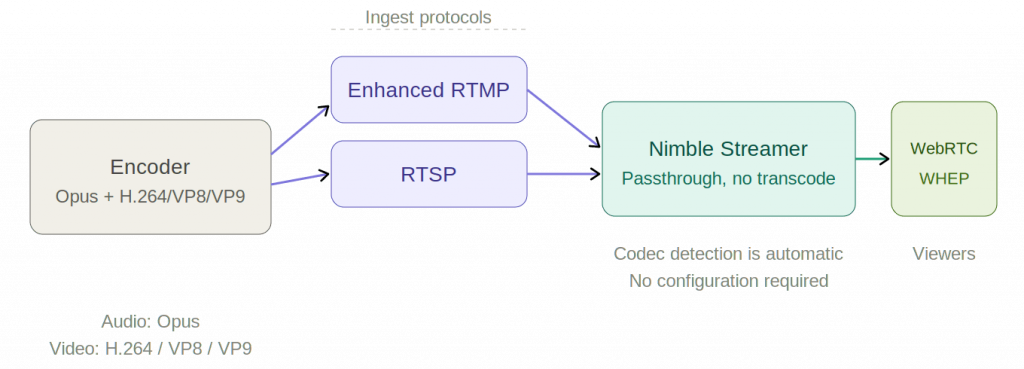
Why it matters: the zero-transcode path to WebRTC
Before this update, getting a live stream to a WebRTC WHEP endpoint typically meant at least an audio transcode step: your encoder sends AAC, Nimble converts it to Opus, then delivers it via WHEP. That works, but it costs latency and compute.
Now, if your encoder outputs Opus over Enhanced RTMP or RTSP alongside a compatible video codec, Nimble can do this instead:
Encoder (Opus + H.264 / VP8 / VP9)
  → RTMP or RTSP ingest
    → Nimble Streamer
      → WebRTC WHEP playback
No transcoding node, no added delay. Just a clean end-to-end path at the lowest possible latency, which is exactly what real-time streaming use cases demand. This is especially useful for interactive or near-real-time scenarios – auctions, sports commentary, live Q&A, remote production – where every added millisecond of latency has a cost.
Setup overview
The setup is straightforward. Here’s the high-level flow to get Opus passthrough working end-to-end:
Step 1: Install or upgrade Nimble Streamer
Make sure you’re running the latest version of Nimble Streamer.
Step 2: Configure your ingest application
Set up an RTMP or RTSP ingest application in Nimble via WMSPanel. No special flags are needed, as Opus codec detection is automatic on incoming streams.
For RTMP, you can use published RTMP transmuxing setup article, as well as use RTMP pull scenario to get the stream into Nimble instance.
For RTSP, please refer to RTSP setup article to take the respective stream in.
Step 3: Set up WHEP playback
Configure a WebRTC WHEP output for the stream in using WHEP playback setup article. It has all the details you need to make the output work properly, including setting up our on open-source WHEP player.
Since the incoming audio is already Opus, no transcode route is needed.
Step 4: Send stream from your encoder
Configure your encoder to send Opus audio alongside H.264, VP8, or VP9 video via Enhanced RTMP or RTSP. OBS Studio and FFmpeg both support this combination well.
For a quick test with FFmpeg, use libopus for audio and libx264, libvpx, or libvpx-vp9 for video and push via RTMP to your Nimble ingest endpoint. For example:
ffmpeg -i input.mp4 \
  -c:v libx264 -c:a libopus \
  -f flv rtmp://your-nimble-server/live/stream-key
Now point your WebRTC player to the WHEP endpoint URL to play it.
Besides the WHEP playback, you can use the resulting stream to use it further for cases like transmuxing and delivering it via SRT.
Simpler pipelines, lower latency
Opus support in RTMP and RTSP ingest is one of those improvements that quietly removes a whole category of complexity from your streaming setup. Whether you’re building a low-latency live production workflow or just want to cut down on transcoding overhead, this gives you a cleaner path from source to viewer.
If you have questions, post us a question via the helpdesk.