Subtitles often need to move between different delivery formats. A broadcast input may already carry CEA-708 closed captions inside the video elementary stream, while web and OTT players usually expect WebVTT tracks in HLS. In other workflows, WebVTT may be created by an automatic speech recognition engine or received from an upstream HLS source, but the target playback protocol or player needs captions embedded as CEA-708.
Nimble Streamer supports both subtitles types and can handle both directions for live streams:
- Generate CEA-708 subtitles from WebVTT.
- Generate WebVTT subtitles from CEA-708.
This gives video engineers and OTT operators a practical way to keep one caption source and make it available in the format required by the downstream protocol, player, or device.
Subtitle conversion between WebVTT and CEA-708 uses the same operating system support scope as Nimble Streamer voice recognition. At the moment, this means Ubuntu 24.04 and Ubuntu 26.04. Make sure your Nimble Streamer instance is updated before enabling the feature.
CEA-608 support is currently limited to encoding and decoding the necessary control and preamble codes as well as support for the Basic North American, Special North American and Extended Western European character sets.
Why conversion matters
CEA-708 and WebVTT solve different delivery problems.
CEA-708 closed captions are carried in the video stream. This is a common requirement for broadcast-style workflows and is supported by Nimble Streamer in live output scenarios, including SLDP playback with CEA-708 captions.
WebVTT is a text subtitle format commonly used with HLS and MPEG-DASH. It is also the output format used by Nimble Streamer voice recognition workflows, where subtitles are generated from audio and added to the HLS output.
With conversion in Nimble Streamer, you can use the same incoming or generated subtitle data in several playback contexts. For example, WebVTT created by voice recognition can be converted into CEA-708, and CEA-708 captions already present in a source stream can be exposed as WebVTT for HLS playback.
Converting WebVTT to CEA-708
Use this mode when Nimble already has WebVTT subtitles and you need CEA-708 captions in the output stream.
Common WebVTT sources include:
- WebVTT generated by Nimble Streamer AI-powered voice recognition.
- WebVTT received from a pulled HLS source.
To enable WebVTT to CEA-708 conversion:
- Open WMSPanel.
- Go to Nimble Streamer / Live Streams Settings.
- Select the target server.
- Open either Global settings or a specific output Application setting.
- Enable Generate CEA-708 subtitles from WebVTT.
- Save the settings.
- Restart the input stream so the updated live settings are applied.
After that, Nimble Streamer will take available WebVTT subtitles for the stream and generate CEA-708 captions from them.
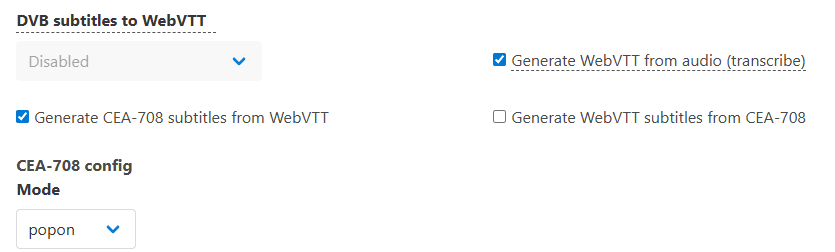
This is useful when your WebVTT is created by voice recognition but the delivery chain also needs embedded captions. It also allows SLDP to carry CEA-708 captions generated from WebVTT, as SLDP Player and Nimio support CEA captions.
Two common WebVTT source scenarios are worth mentioning here.
If Nimble Streamer pulls an HLS stream that already contains WebVTT subtitles, it can take those subtitles from the upstream stream and create its own local WebVTT for the resulting output. That local WebVTT can then be used as the source for CEA-708 generation, including SLDP delivery scenarios where CEA captions are required.
If WebVTT is generated by Nimble Streamer voice recognition, the conversion can use those ASR-generated subtitles as well. This allows the same live speech recognition workflow to serve HLS players with WebVTT and also provide CEA-708 captions for protocols or devices that need embedded captions.
Converting CEA-708 to WebVTT
Use this mode when the incoming stream already carries CEA-708 captions and you want Nimble Streamer to generate WebVTT subtitles for HLS output.
To enable CEA-708 to WebVTT conversion:
- Open WMSPanel.
- Go to Nimble Streamer / Live Streams Settings.
- Select the target server.
- Open either Global settings or a specific output Application setting.
- Enable Generate WebVTT subtitles from CEA-708.
- Save the settings.
- Restart the input stream so the updated live settings are applied.
After the stream restarts and Nimble receives CEA-708 captions, it will generate WebVTT subtitles for the output.

This is useful when your contribution stream already has embedded captions, but your OTT playback stack expects WebVTT subtitle tracks in HLS.
Mutually exclusive modes
The two conversion options are mutually exclusive: when you enable one option, the other one is automatically disabled. This prevents a loop where Nimble would try to generate each format from the other at the same time.
Choose the direction based on the subtitle source that is actually present in the stream:
- If the source is WebVTT, enable CEA-708 generation from WebVTT.
- If the source is CEA-708, enable WebVTT generation from CEA-708.
Let us know how this works for your streaming scenarios.